
RiskFlag risk management software
RiskFlag AI
A team member who knows RiskFlag, and your data.
Switch it on for your organisation and everyone gets an assistant that reads, understands and works on your safety cases, registers, bow ties and compliance records: answering questions, making the changes you approve, reviewing whole cases and keeping watch on a schedule.
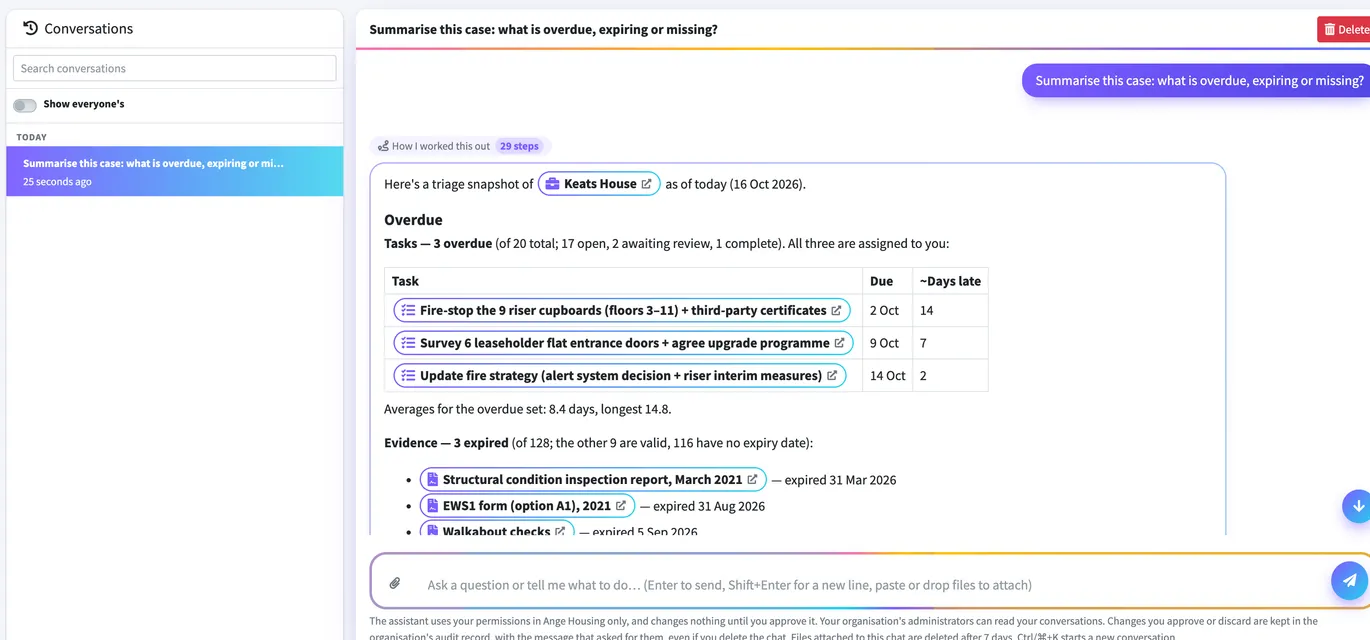
“Which fire doors failed last month, and who owns the fix?” It answers from your organisation’s own cases, registers, bow ties, tasks and evidence, and links to every record it used.
Ask how to do something and it answers from our user guide, then offers to do it for you. It knows the page you are on, so “this case” means the one in front of you.
Claims and sub-claims, register rows, tasks and comments, a document filed into a slot: it prepares the changes, shows you exactly what will change, and makes them when you approve.
Drop in a PDF, Word, Excel or image. Summarise a report, check a certificate against a register, or file it as evidence.
Ask for a whole case to be checked. It plans which records to check, you approve the plan, and it checks every one and reports its findings by severity, with anything it could not check.
Set a prompt to run daily, weekly or monthly, such as “what is overdue or expiring?”, and the answer is kept and emailed to you and your team.
Upload an existing safety case report and it proposes the case it describes: claims, arguments and evidence, ready for you to review and apply.
With the Compliance module, turn a paper form or spreadsheet into a ready-to-use inspection checklist.
Organisation admins tell it the terms you use, the standards you follow and who to refer people to, and it answers in your house style.
Help that knows where you are
The RFAI button on every page opens the assistant beside whatever you are looking at. It knows the page, suggests what it can do there, and keeps the conversation going as you move around RiskFlag. If you work across several organisations, ask them all at once and get an answer from each.
Powerful, and in your control
RiskFlag AI is switched on organisation by organisation, and only when you choose. Once it is on, it works under the same rules as everyone else.
It sees only what the person asking can see, and can do only what they can do.
Each change is shown first, field by field, and made only when approved. Every decision is kept in the audit record.
Administrators can read every conversation, and review or stop any thorough review.
Use RiskFlag-managed AI, which runs in the UK and EU, or connect your own provider under your own agreement. Your data is not used to train AI models.
For the full detail, see our security and data handling page.
RiskFlag AI FAQs
No. AI is available to organisations that opt in, and an organisation admin switches it on. Without it, nothing AI-related appears.
Only with your approval. Every change it proposes is shown first, with what it alters, and is made only when you approve it. Approved and discarded changes are kept in the organisation’s audit record.
Yes. Choose your own provider and key in AI Settings, or use RiskFlag-managed AI with a monthly allowance and nothing to manage.
Yes. RiskFlag’s secure connector lets Microsoft Copilot and other AI assistants that support MCP work with your RiskFlag data, using each person’s own permissions.
Book your RiskFlag demo