RiskFlag risk management software
Bow Tie
See what could go wrong. Show how it’s under control.
Map every threat, barrier and consequence in one diagram, score how well each barrier works, and connect it to the safety case, registers and frameworks that rely on it.
Bring clarity to high-consequence decisions
When outcomes are serious but probabilities are hard to define, bow tie analysis offers a proven, visual way to explain what could go wrong, what is in place to stop it, and what happens if it doesn’t work.
RiskFlag turns each bow tie into a live record. Barriers carry their owners, review dates and effectiveness scores, and link to the evidence that proves they work, so the diagram stays true long after the workshop.

What the Bow Tie module helps you do
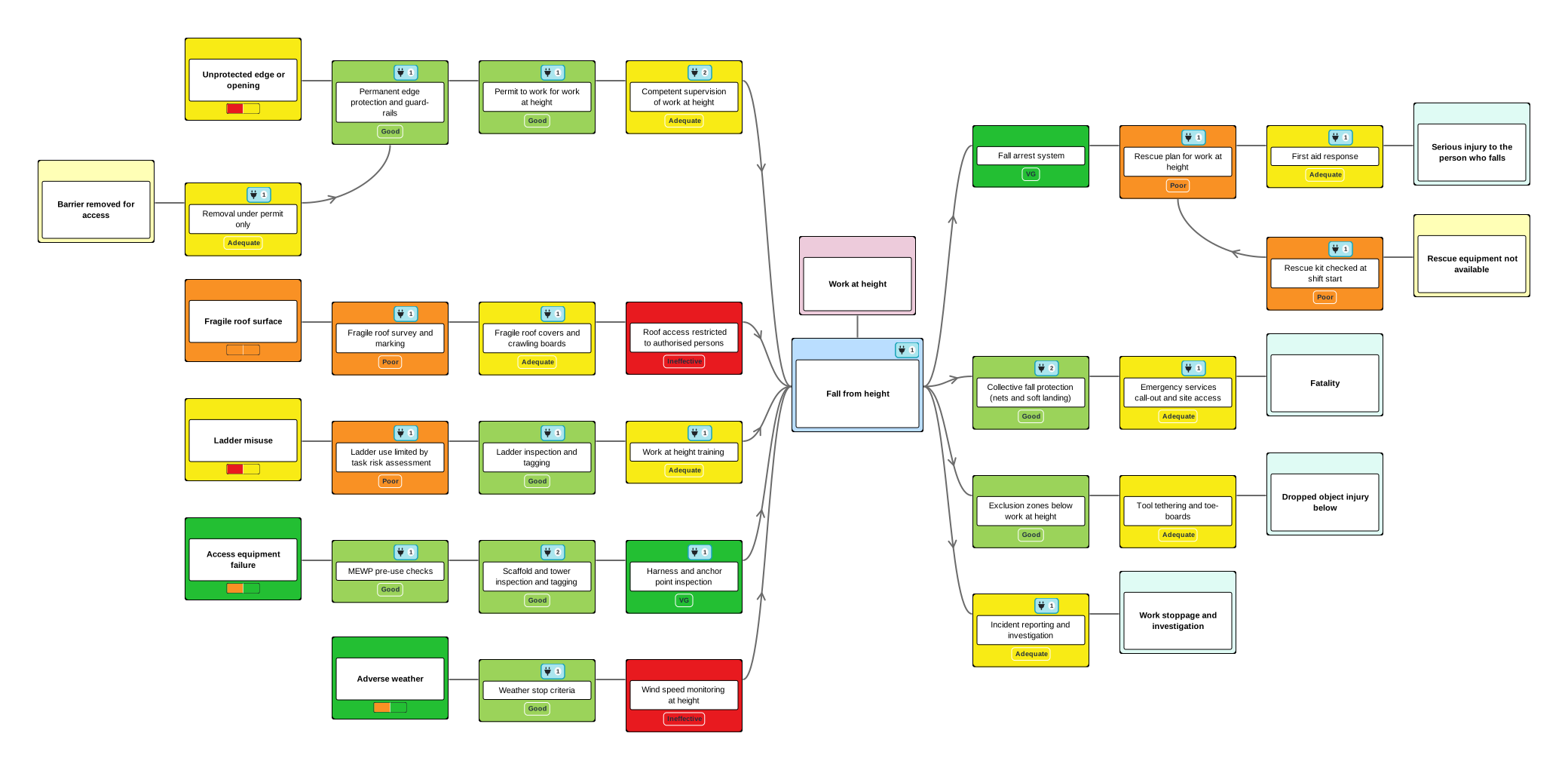
Lay out each hazard the way the method describes it:
- The hazard you can’t remove, and the top event where control is lost
- The threats that could cause it, and the consequences that could follow
- Preventative, recovery and mitigation barriers, in the order they act
- Degradation factors that could weaken a barrier, and the controls that keep them in check
Every element is a full record, not just a box on a drawing: a description, files, your own metadata such as barrier type, owner and review date, scores on your assessment tools, tasks and connections.
Key features
Right-click to add threats, barriers and degradation factors, drag to rearrange, and isolate one strand or filter the diagram to what matters. Every change can be undone.
Rate elements on your own assessment tools, from a barrier effectiveness scale to a risk matrix, with forecasts against milestones. Colour the diagram by score so weak barriers stand out.
Link any element to the claims and arguments in your safety case, to register rows, to other bow ties and to assurance framework entries, so each control is described once.
Name barrier owners and review dates on each element. RiskFlag reminds the right people as dates approach, and tasks raised on an element show on the diagram.
Hold bow ties at organisation level or within cases. Clone one into every case, paste parts between diagrams, and update a barrier wherever it appears with Save & Ripple.
Export to PDF or editable ODT with tables, text and a diagram for each strand, include bow ties in case reports, and import or export BowTieXP spreadsheets.
Benefits at a glance
See which barriers you can rely on
Score each barrier on your own effectiveness scale and the diagram colours itself, so a weak barrier is obvious in a workshop or a board pack. Every score keeps its justification and its history, and a hover shows the scale behind it.
Scores that show what changed
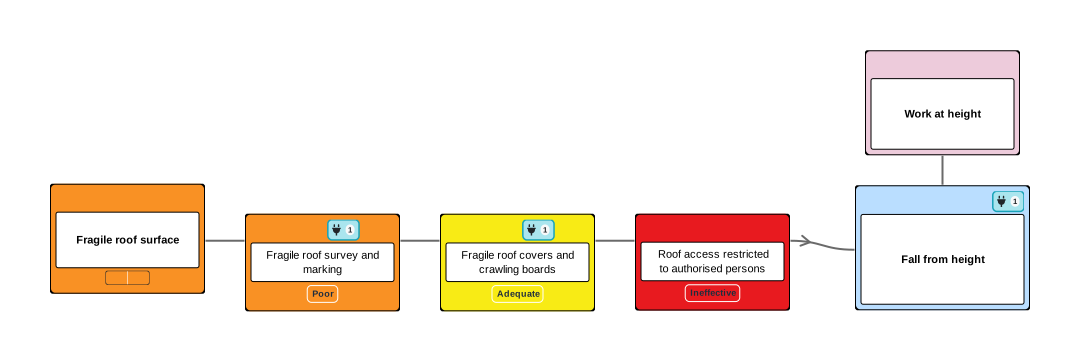
Hover any score and RiskFlag draws it on its matrix. Where a threat is scored before and after its barriers, an arrow shows how far the barriers move it.
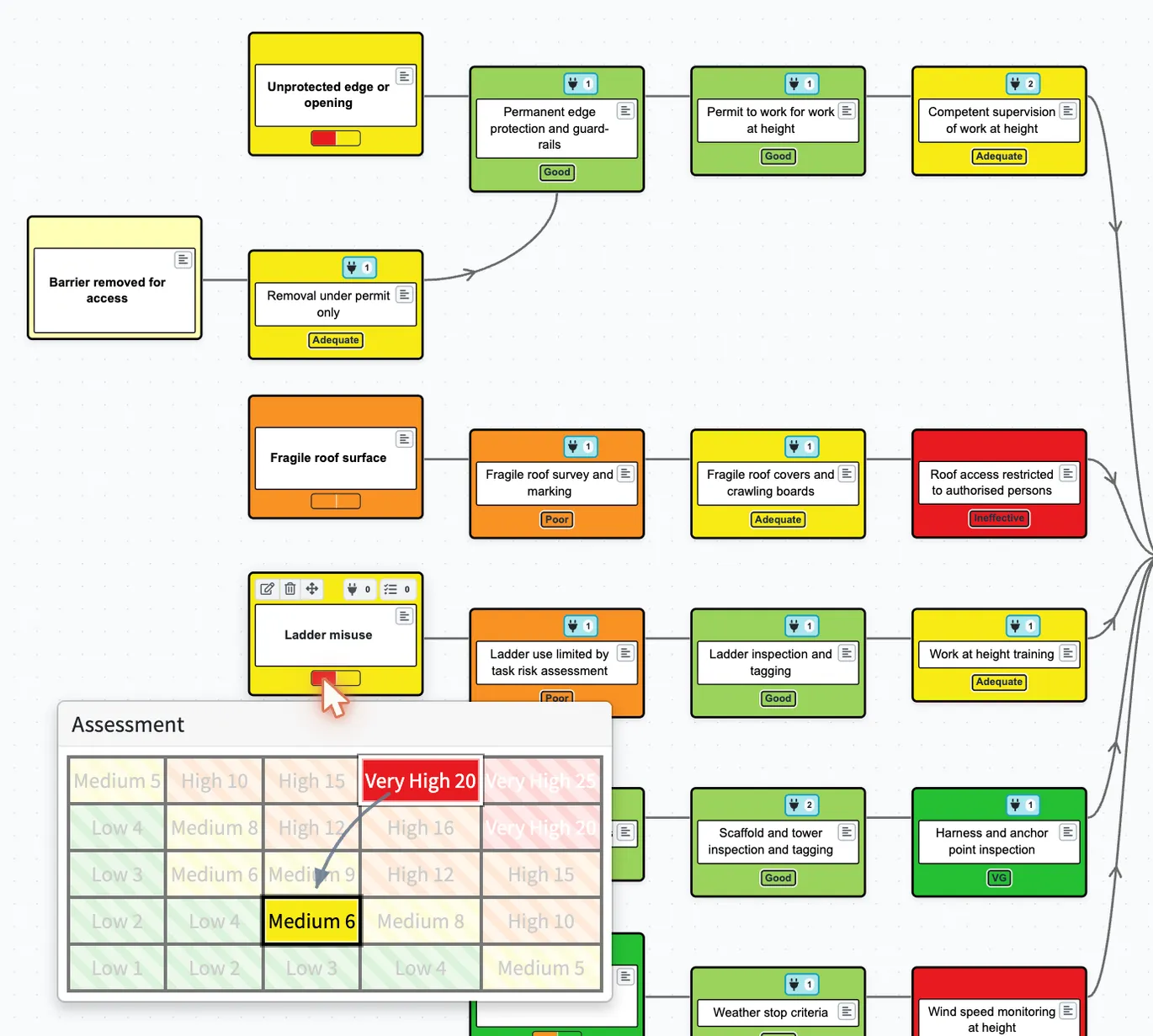
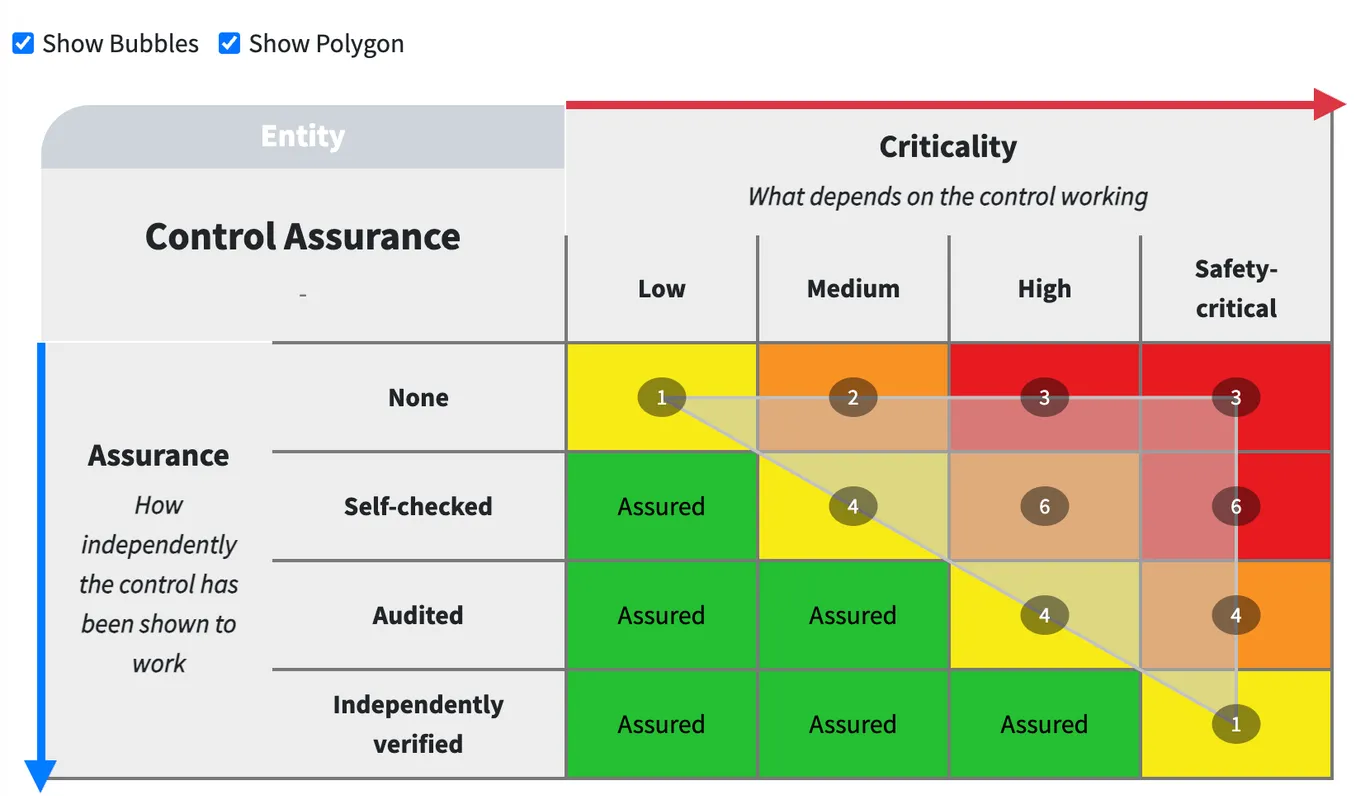
Score barriers with more than one tool, such as how effective they are and how independently that has been shown, and Analysis plots each one across every bow tie in your organisation.
Ask questions across every bow tie
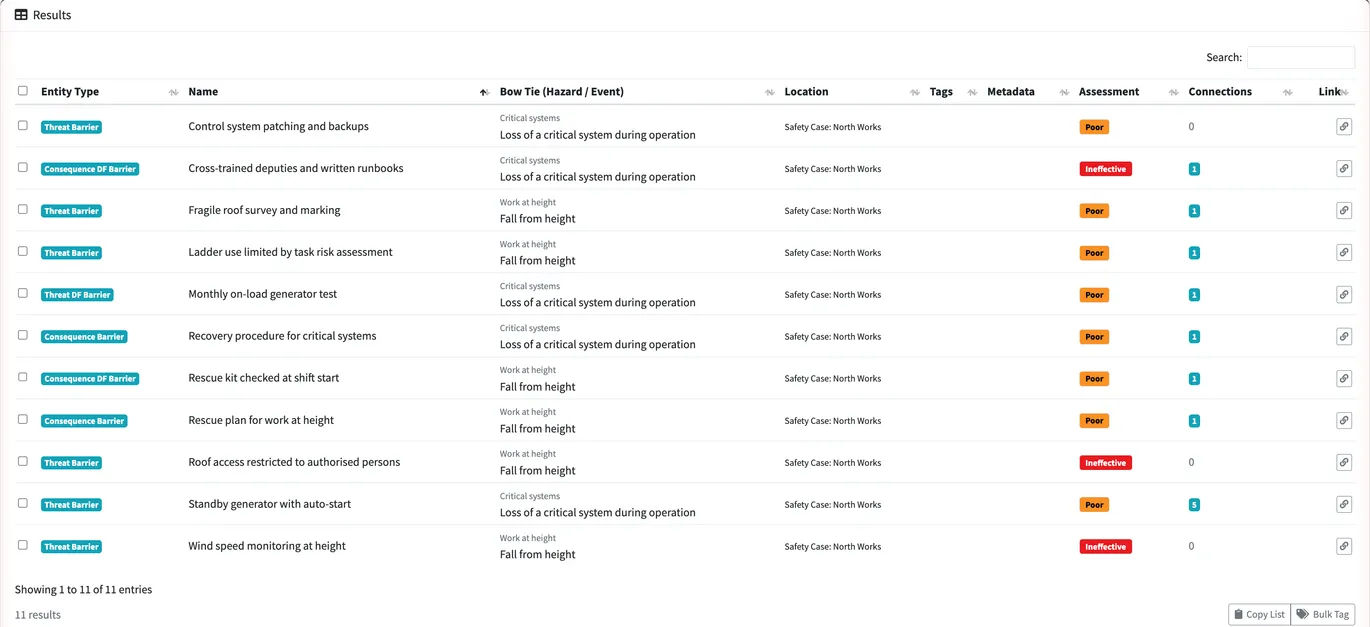
The Analysis page searches every bow tie in your organisation at once, by element type, metadata, score, structure and connections, to answer the questions no single diagram can. Which barriers are rated poor? Which have no owner, or a review date that has passed? Which have never been assessed, or are not backed by any claim, register or framework entry?
Save a question as a preset, keep it on your dashboard, or run it as a section of your case reports.
One control, described once
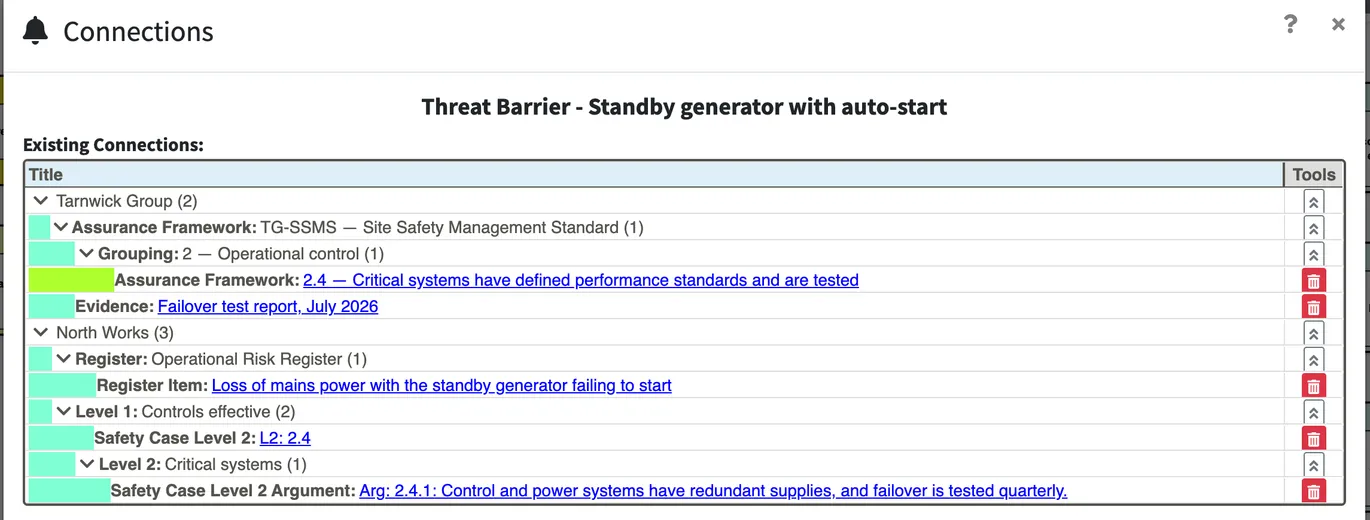
A barrier on a bow tie is often the same control a safety case argues for, a register tracks and a regulation requires. Connect them, and each one shows the others: open the barrier and see the claim, the argument and its evidence; open the claim and see the barrier.
Connections can reach your registers, your other bow ties and your assurance frameworks, such as a regulator’s requirements or a standard you work to. Save & Ripple applies the same connections to that barrier on every bow tie it appears on.
One module, whatever you’re responsible for
The Bow Tie module works the same way wherever the risk sits: a building, an aircraft, a railway, a vessel, a site or an uncrewed operation. You score barriers on your own scales and connect them to your own cases, registers and assurance frameworks, so it fits the way your sector works rather than the other way round.
We work with clients in Housing, Aviation, Defence, Rail, Maritime, Nuclear and Uncrewed Systems.

Why choose RiskFlag?
- We’re risk-thinking: RiskFlag brings together deep sector experience, lived responsibility, and a commitment to clarity, equipping people to make sound decisions under pressure.
- We push boundaries: We apply aviation-grade safety case logic, rethink how evidence is structured, and challenge conventional ways of working when they don’t stand up to scrutiny.
- We design for decision-makers: RiskFlag is built for the people who carry the weight of risk. We provide better structure, support, and tools that hold up in the moments that matter.
- We stay close: You get direct access to the people behind RiskFlag. We’re here to offer you fast support and transparent advice from day one.
- We keep improving: If something can be clearer, faster, or more robust, we change it. We’re constantly innovating to find the best risk management solutions.

We’ve been where you are. That’s why we’ve built what no one else could – industry-defining software, shaped by lived experience and backed by experts who know what’s at stake.
FAQs
Bow tie analysis is a risk management method that draws the pathway from the threats that could cause a loss of control, through that moment, to the consequences that could follow, with the barriers that stop each one shown in between. The diagram makes complex risks easier to explain and shows how they are being managed.
It shows the whole risk picture on one page. Weak points are easier to spot, you can check whether barriers are working, and it is clear who is responsible for each one. With scores and owners on the diagram, decisions rest on the current state of each barrier, not on the workshop it was drawn in.
Yes. The Bow Tie module is designed to follow the approach set out by the Center for Chemical Process Safety (CCPS) in Bow Ties in Risk Management: hazards, top events, threats, consequences, preventative, recovery and mitigation barriers, degradation factors and their controls.
Yes. Your organisation builds its own assessment tools, such as a barrier effectiveness scale or a likelihood and severity matrix, and chooses which kinds of element each applies to. Scores can be recorded once, before and after mitigation, or as forecasts against your milestones.
Yes. RiskFlag imports and exports the BowTieXP spreadsheet format, so existing diagrams can be brought in and yours can be opened in other bow tie software.
No. Bow ties can be held at organisation level or inside a case, and a case built from bow ties and registers alone is complete. When you do build a claim structure, connections tie each barrier to the claims and arguments that rely on it.
RiskFlag takes a proven method and builds it into a connected platform. Barriers link to your safety cases, registers, tasks and assurance frameworks, scores and owners stay current, and every change is kept in the activity log, so you have a bow tie process you can trust and explain.
Book your demo today!