RiskFlag risk management software
Compliance
Your whole compliance picture, from the front line to the boardroom.
Plan inspection rounds across every site and asset, carry them out on site with the RiskFlag app, review every answer, and track each defect to closure with tasks. You always know where you stand, and every report files itself as evidence in your safety cases.
What the Compliance module helps you do
Every activity by domain, from fire safety to electrical checks and equipment, with how each site’s assets stand and what is due or late.
Failed answers become remedial tasks with owners and deadlines, tracked to closure alongside every other task in RiskFlag.
Reviewers pass or fail each answer, and a critical review goes straight to the most serious failures.
Start from a library of standard checklists or build your own, with pass and fail rules, required photos and reviewer fields.
Run checklists across sites in rounds. A filed report makes the next round fall due, so nothing is forgotten.
Inspect the actual door, machine or extinguisher. Scan its QR tag on site to open the right item.
Record defects or readings as rows within a checklist item, so findings stay with the check that found them.
Give rounds to contractor organisations, who work through the same checklists in the app or their own portal.
Each round produces a report and files it into the case it covers, as evidence on its Golden Thread.
Know where you stand, across every site
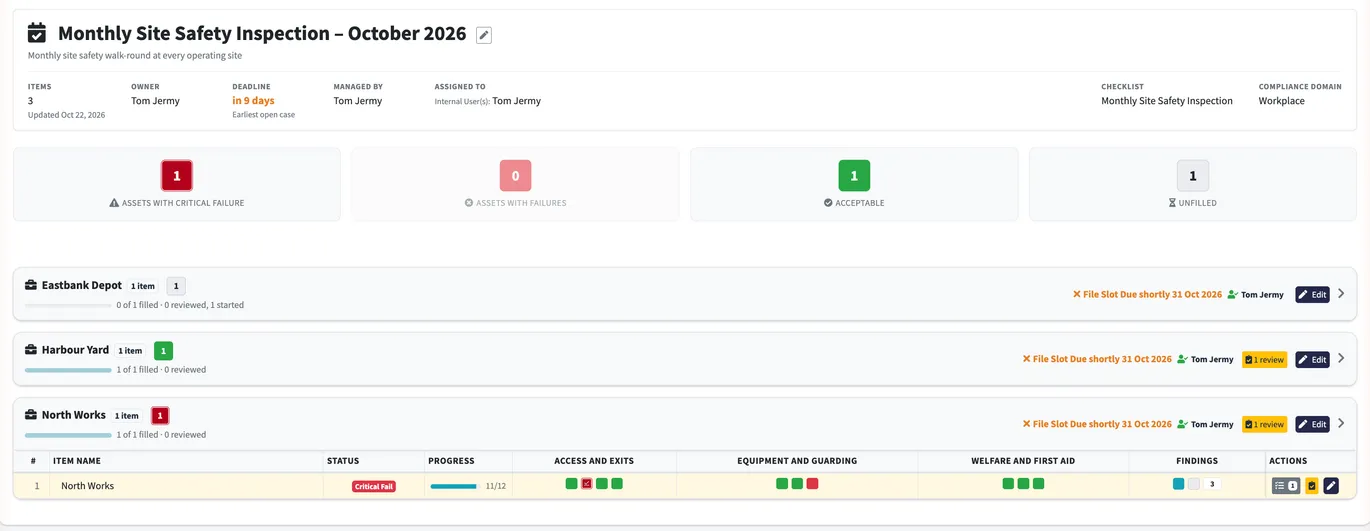
Every compliance activity in your organisation on one page, grouped by domain: how many assets in each have a critical failure, a failure, pass or are still to do, what is waiting for review, and which rounds are due or late. Hover a number for the sites behind it, and click it to open them.

Built for the people on site
The RiskFlag app takes your checklists wherever the work is: plant rooms, hangars, depots, vessels and roof spaces. Inspectors work offline, scan QR tags, take photos and add voice notes, and everything syncs back the moment there is signal.
The RiskFlag app for iPhone, iPad and Android is coming soon to the App Store and Google Play.
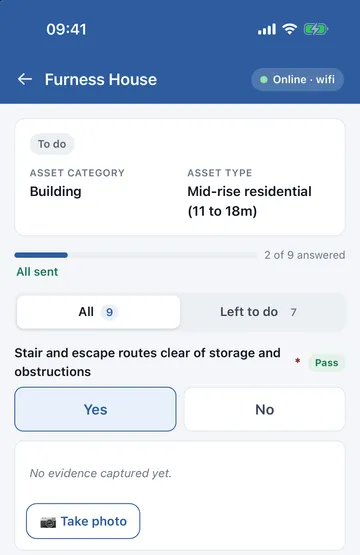
Download a round before you go, inspect with no signal, and sync when you are back online.
Capture evidence as you go. Voice notes are recorded against the item you are inspecting.
QR tags on doors and equipment open the right asset, so the record matches what was checked.
Results appear in RiskFlag as they are saved, so managers see progress during the round, not after it.
On site and in the office, at the same time
As an inspector answers each question on the phone, the activity page in the office updates on its own: each site moves from unfilled to acceptable, and the finished check arrives ready for review. No refreshing, no waiting for a report.
A walkround filled in on an iPhone (left) while the activity page updates live in the office (right). Sped up in places.
From finding to fix, tracked with tasks
A failed check is the start of the work, not the end of the record. Each failure becomes a remedial task with an owner, a deadline and a running progress report, assigned to your own people, a team or a contractor. It shows on the Tasks page and on everyone’s dashboard until it is closed, flagged as due soon and then overdue.
Because tasks are linked to what they affect, the same task appears on the asset, its case and the claims that rely on it. Reviewers sign off results before they count, and every answer, photo and change is kept in the activity log.
Compliance FAQs
Anything you can describe as a checklist: fire doors, equipment, vehicles, water temperatures, electrical visual checks, site walkabouts and more. Checklists can target asset types, so each item is answered against the right door, outlet or piece of equipment.
Failed answers become remedial tasks with owners and deadlines. They sit on the Tasks page with every other task in RiskFlag, appear on the asset and its case, and stay open until they are closed.
Yes. Rounds can be assigned to your own teams or to contractor organisations, who fill them in with the same app and checklists.
No. Checklists can be filled in from any browser. The app adds offline working, QR scanning, photos and voice notes on site.
Each round's report is filed against the case it covers, and results can be connected to the claims and arguments in that safety case, so your evidence stays current without re-keying.
Book your RiskFlag demo